DI.FM: Electronic Music Radio
- 4.7
- Rating
- 5.00M
- Installs
- Free
- Price
 Analysis by App-foxy
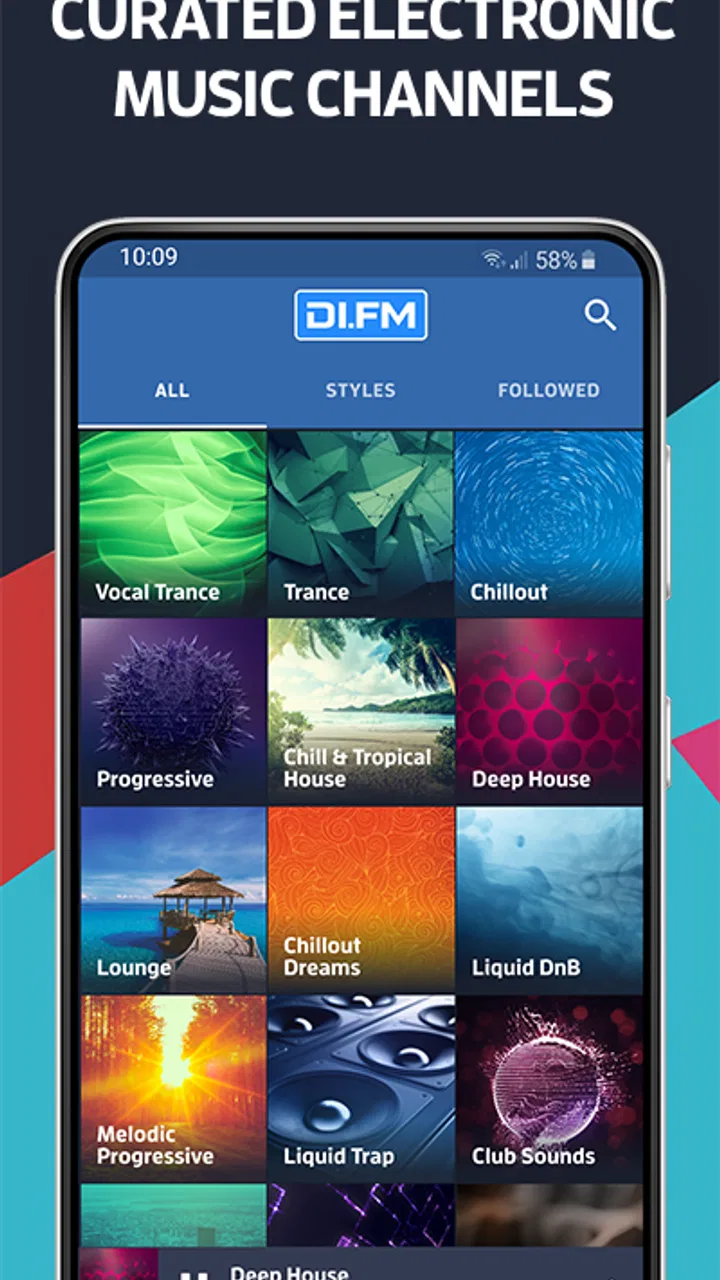
When I first opened DI.FM, I understood its appeal quickly: it is built for people who want electronic music playing now, without spending time assembling a queue or deciding what to hear next. This Music & Audio app from Digitally Imported Inc focuses on radio-style listening, with more than a hundred stations covering styles such as Trance, House, and other electronic sounds. I found it most useful when I wanted a steady atmosphere rather than a carefully managed personal library.
The difference matters. A music subscription built around albums and individual tracks asks me to search, choose, and skip. DI.FM starts from the mood or genre I want, then lets the station carry the session. That makes it a natural companion for commuting, working, studying, cooking, or simply filling a quiet room. It is free to install, carries a Teen content rating, and has reached over five million installs with a 4.7 average from around ninety-eight thousand ratings. Those figures suggest a mature audience, but they do not remove the need to see whether its radio-first approach fits your habits.
What to expect from the listening experience
The app is best understood as a collection of electronic radio channels rather than a conventional on-demand music catalog. I do not open it expecting to search for one exact song and play it immediately. Instead, I choose a station based on the sound I want and let the programming create the flow. That small change in expectation makes the whole experience feel simpler.
You May Also Like

 Blood Strike: 2.5 Anniversary
Blood Strike’s Loadouts Turn Every Drop Into a Tactical Gamble
A close look at Blood Strike’s custom loadouts: how fast access to signature weapons reshapes its battle royale rhythm, rewards preparation, and narrows the gap between fights.

 Pandora - Music & Podcasts
Pandora’s Music Is Easy to Start, but Harder to Recover
Pandora’s strength is its low-effort path from a seed to a station. Its weak spot is how much confidence it asks you to place in connection, setup, and quiet recovery.

 8 Ball Pool
 Is Built on Rivalries, Rematches, and Routine
A close look at the rivalries, rematches, shared routines, and unanswered safety questions that turn a quick pool match into a persistent mobile community.

 Samsung Music
’s Quiet Strength Is Playing What You Already Own
Its reach comes less from spectacle than from dependable access to a personal library. That simplicity is both the app’s strongest retention engine and its ceiling.

 AccuWeather: Weather Radar
AccuWeather Review: A Quick, Clear Forecast for Everyday Decisions
For everyday plans, the best forecast is the one you can understand quickly. AccuWeather makes rain timing, radar, and local conditions easy to act on, with a few trade-offs.

 Hill Climb Racing
Why Hill Climb Racing Still Turns Crashes Into One More Run
A tiny car, a bumpy hill and one more upgrade: Hill Climb Racing keeps resurfacing because its simple chaos makes every near-miss feel personal.
More From Our News Desk



For a first-time listener, the large selection can initially feel less like freedom and more like a menu with too many choices. Trance and House are easy starting points because they describe familiar broad directions, while more specific electronic styles may appeal once I know what kind of energy suits me. My practical advice is to avoid browsing every station at once. Pick the channel whose name most closely matches your current activity, listen long enough to judge its character, and only then explore alternatives.
This approach works particularly well when I need continuity. During a work session, I would rather press play once and keep my attention on the task than repeatedly interrupt myself to select another track. The same is true while driving, although I would always make station choices before moving. For exercise, the value depends on personal taste: a consistent channel can keep momentum, but someone who needs a precise sequence of songs may prefer a playlist service.
The app’s strength is variety within a focused musical world. It is not trying to be a general-purpose destination for podcasts, spoken programs, classical recordings, or every mainstream genre. If electronic music is only an occasional interest, the station-based design may feel narrow. If it is the sound you return to regularly, that focus becomes an advantage because the app does not bury the experience under unrelated content.
I also noticed an important trade-off between discovery and control. Radio programming can introduce tracks or subgenres I would not have selected myself, which is useful when my usual playlist has become repetitive. At the same time, I have less control over the exact order and less certainty that a particular favorite will appear when I want it. DI.FM is therefore strongest when I value uninterrupted atmosphere more than complete control.
Setting it up without overthinking the choice
The Android release is listed as version 6.4.2.12751 and supports devices running Android 6.0 or later. That gives the app a broad reach across older Android hardware, although the smoothness of any music app can still depend on the phone, its available storage, and the quality of the connection. I would install it on the device I actually plan to use for listening, especially if that means a phone connected to a car or a speaker.
On the first launch, my recommendation is to treat the station list as a tasting menu. Start with one familiar label, such as Trance or House, rather than trying to identify the perfect channel immediately. Listen for three things: whether the tempo suits the activity, whether the sound is too intense for the time of day, and whether the programming feels varied enough to hold attention. These are more useful tests than choosing a station only because its name looks appealing.
A common first-time mistake is assuming that a radio app should behave like a downloaded music player. I would not begin by searching for a specific artist or expecting to build a complete offline collection. Begin with the live-style station experience, because that is where the app’s design makes the most sense. Once I know which channels work for me, returning to the app becomes much faster.
The app is free, though it includes in-app purchases ranging from $0.99 to $89.99 per item. I would pay attention to the purchase screens and decide early whether the free experience already meets my needs. Someone who only wants occasional background listening may have no reason to spend money, while a frequent listener may consider additional paid options worthwhile. The important point is to judge those choices against actual use rather than assuming every available purchase is necessary.
Because the content rating is Teen, parents should still consider whether the app suits the listening habits and maturity of the person using the device. The rating is not a substitute for personal supervision, but it is useful context when the app is being installed on a shared or younger user’s phone.
Reaching the first meaningful result
For me, the first successful action is not merely opening a station. It is finding one that can remain on while I complete a real task. I suggest choosing a simple scenario: make a drink, start a short work block, tidy a room, or take a walk. Start one station before the activity begins, then resist switching immediately. After several minutes, ask whether the music supports the task or competes with it.
This test reveals more than rapid channel hopping. A station that sounds exciting for a minute may become distracting during reading. Another that seems subtle at first may be ideal for concentration. I use that distinction to create a small personal routine: one energetic channel for movement, one restrained option for desk work, and one familiar choice for relaxed listening. The app becomes more useful once I connect stations to situations rather than evaluating them only as isolated genres.
Another practical tactic is to explore at the edges of your preferred style. If House is your normal starting point, try a neighboring electronic channel rather than jumping randomly across the entire catalog. This can produce more interesting discoveries while keeping the overall mood recognizable. It is a better use of time than repeatedly returning to the same station whenever a track does not immediately appeal.
I also recommend testing the app during the exact conditions in which you plan to use it. Listening at home on a stable connection may feel effortless, while a commute or outdoor session can expose interruptions or other practical annoyances. I would not build a daily routine around it until I had tried it in that setting. This is especially important for anyone who expects uninterrupted sound during travel or exercise.
When the first station works, save the memory of why it worked: perhaps it had a steady pace, a darker atmosphere, or enough movement to prevent boredom. That observation helps with later choices. Instead of thinking only in genre names, I begin looking for qualities such as intensity, focus, warmth, or momentum. This is one of the easiest ways for a new user to make the broad station selection feel manageable.
Confusions that can make the app feel less useful
The biggest source of frustration is expecting exact-song control from a radio format. If I need one particular track for a performance, a carefully timed workout, or a personal playlist, DI.FM may not be the right primary tool. A conventional on-demand service is better in that situation because it puts the song order in my hands. I would use DI.FM for discovery and atmosphere, then switch to another service when precision matters.
Another confusion is treating every station with a familiar genre label as interchangeable. Electronic genres can vary widely in tempo, mood, and texture. Two channels that appear related may feel completely different during a quiet morning or a focused work period. Rather than deciding that the app is inconsistent after one quick sample, I would try a few closely related stations at different times and note which context suits each one.
The wide selection can also encourage constant switching. That habit undermines the main benefit of radio listening. If I change channels every time a track is not an instant favorite, I turn a low-effort listening app into another source of decision fatigue. A better workflow is to give a promising station a fair trial, switch only when the overall mood is wrong, and keep a short mental list of reliable choices.
There is a similar issue with free access and optional spending. Seeing in-app purchases does not automatically mean the free version is unusable, but it does mean I should understand what I am choosing before confirming a transaction. I would use the app for several ordinary sessions first, then decide whether any paid feature solves a problem I actually have. This is particularly sensible for casual listeners who may only need background music a few times a week.
New users may also wonder whether the app replaces their existing music service. In my view, it usually complements one rather than replacing every other option. A personal library remains better for albums, favorites, and exact playback. DI.FM is better when I want a curated electronic environment without building the sequence myself. Keeping both roles separate makes the choice feel intentional instead of competitive.
It is also worth being realistic about attention. Some electronic stations are excellent for repetitive tasks but not for every kind of concentration. If I am writing something that requires careful wording, a high-energy channel can pull my attention away from the screen. For those moments, I choose a calmer station or silence. The app gives me options, but it cannot decide what my brain will find distracting on a particular day.
Turning a first listen into a useful routine
Once I have identified a few dependable channels, the next step is to assign them jobs. I might use one for starting a morning, another for routine office work, and a more energetic option for cleaning or exercise. This simple system reduces browsing and makes the app feel personal without requiring a large library or a complicated setup.
I would also revisit those choices rather than assuming the first successful station must remain perfect. My tolerance for intensity changes with the time, workload, and setting. A channel that helps me exercise may be too forceful for late-night reading. The useful insight is not to find one universally best station, but to build a small set of choices that match different situations.
For shared spaces, I would make the first selection with other listeners in mind. Radio works well when nobody wants to manage the music constantly, but a highly specific electronic style may not suit everyone in a home or office. In that case, a broader or more restrained channel is a better compromise than repeatedly handing the phone around to negotiate each track.
For travel, I would prepare my listening plan before leaving. Choose the station while stationary, check that the phone is ready for the intended session, and avoid relying on last-second browsing. I would also keep a backup entertainment option for situations where listening conditions change. That is not a criticism unique to this app; it is simply good practice whenever a radio-style service is part of a commute or trip.
People who enjoy discovering artists and styles may get more from DI.FM than listeners who already have a perfectly organized collection. The app’s value grows when I allow the station format to surprise me. On the other hand, listeners who dislike programming choices made on their behalf, need lyrics or album context constantly, or want complete offline control should probably look first at a different kind of music service.
The developer, Digitally Imported Inc, has kept the product focused on electronic radio rather than turning it into a general audio platform. I appreciate that clarity. The experience feels purposeful because the app knows what kind of listening it is trying to support. The downside is that anyone hoping for a broader all-in-one audio solution will find the scope limited.
My recommendation after using it
I recommend DI.FM to a friend who enjoys electronic music and wants reliable background listening with enough variety to avoid repeating the same personal playlist. Its strongest moment is the transition from “I do not know what to play” to “this station fits the next part of my day.” That is a small problem, but it is one the app solves neatly when the radio format matches the listener.
I would be more cautious recommending it as a sole music app. The lack of exact control inherent in radio listening can be a real disadvantage, and the station choice may require patience before it feels personal. The free starting point makes experimentation easy, but I would not purchase anything until I knew how often I would use the service and which limitations mattered to me.
Overall, my view is that DI.FM is a focused tool rather than a universal replacement for every music platform. It is particularly good for mood-led listening, electronic discovery, and hands-off sessions where I want sound to accompany an activity. It is less suitable for building precise playlists, collecting favorite albums, or guaranteeing a specific song at a specific moment.
The app’s current version, 6.4.2.12751, supports a long-established Android audience, and its strong average rating reflects broad approval. I would still make the decision based on listening style rather than popularity. If you want electronic radio that gets you from installation to a working soundtrack with little effort, this is worth trying; if you want total playback control, choose an on-demand alternative instead.
FAQs for DI.FM: Electronic Music Radio
01What is DI.FM: Electronic Music Radio?
DI.FM is a streaming radio app focused on electronic music. It offers a large selection of genre-based channels, including trance, techno, house, drum and bass, chillout, and more. Instead of choosing individual songs like in a traditional music library, you can tune into live stations curated around specific electronic styles and discover new artists, mixes, and tracks throughout the day.
02Is DI.FM: Electronic Music Radio free to use?
DI.FM provides free access to many of its radio channels, although the free experience may include advertising, stream limitations, or other restrictions depending on the platform and current subscription policy. A premium membership is generally available for listeners who want additional benefits, such as higher-quality audio, fewer interruptions, and access to extra content or features. Check the app’s current pricing before subscribing.
03What music genres and stations are available in DI.FM?
The app is designed for fans of electronic music and includes a broad range of stations organized by genre, mood, and style. You can typically find channels dedicated to progressive trance, vocal trance, techno, deep house, future bass, liquid drum and bass, ambient, lounge, synthwave, and other electronic categories. The exact station lineup may change as DI.FM updates its programming.
04Can I listen to DI.FM offline without an internet connection?
DI.FM is primarily an online radio and streaming service, so an internet connection is normally required to play its live channels. The app is better suited to Wi-Fi or mobile-data listening rather than offline playback. If you plan to use it while traveling, check your data allowance and connection quality, because continuous streaming can consume a noticeable amount of mobile data.
05Does DI.FM work with Chromecast, car systems, or other devices?
DI.FM can be useful in several listening environments, including phones, tablets, computers, and compatible connected audio systems, depending on the features supported by your device and operating system. Integration with casting, car entertainment systems, Bluetooth speakers, or smart devices may vary. Before downloading, review the current app listing and device compatibility information for the features you need.
Pros
- Huge selection of electronic genres
- from ambient to hardcore.
- Curated stations make discovering new artists quick and easy.
- High-quality audio is available for supported streams and plans.
- Favorites and personalized listening help keep preferred stations accessible.
- Works well for background listening
- workouts
- and long travel sessions.
Cons
- Many premium features require a paid subscription.
- Free listening may include advertisements and other interruptions.
- Some stations or tracks may be unavailable in certain regions.
- The large catalog can feel overwhelming for first-time users.
- Streaming high-quality audio can consume significant mobile data.

DI.FM: Electronic Music Radio
Gallery